devices.esphome.io
Blitzwolf BW-SHP9 Triple powerstrip with dual USB power
Blitzwolf BW-SHP9 Triple powerstrip with dual USB power
Device Type: plugElectrical Standard: euBoard: esp8266


Model reference: BW-SHP9
The powerstrip has four controllable relays, one for each socket, and one for the dual 2.4A usb power.
Manufacturer: BlitzWolf
How to flash
Open
There are 6 triangle screws to open the box.
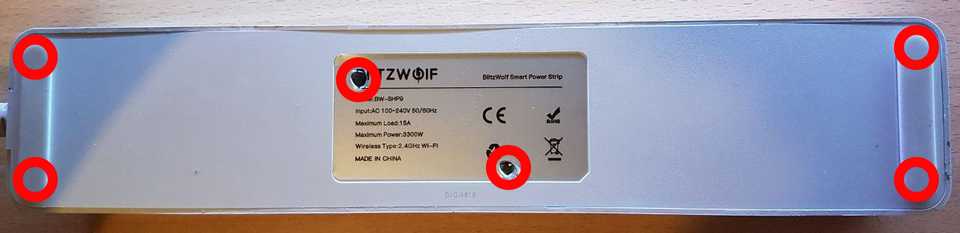
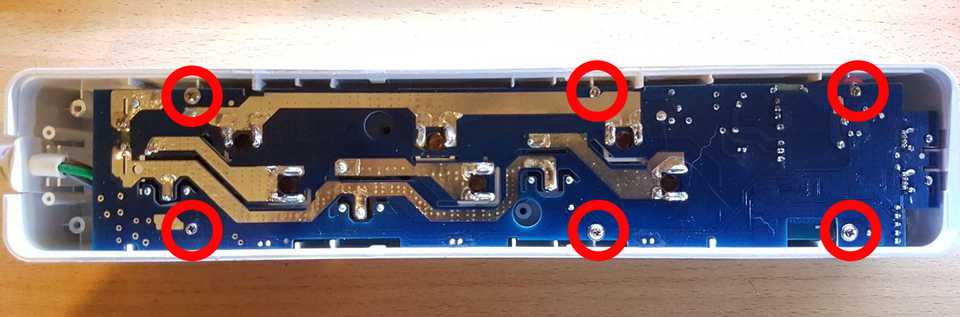
Unmount circuit from the box
6 more screws (classic ones)
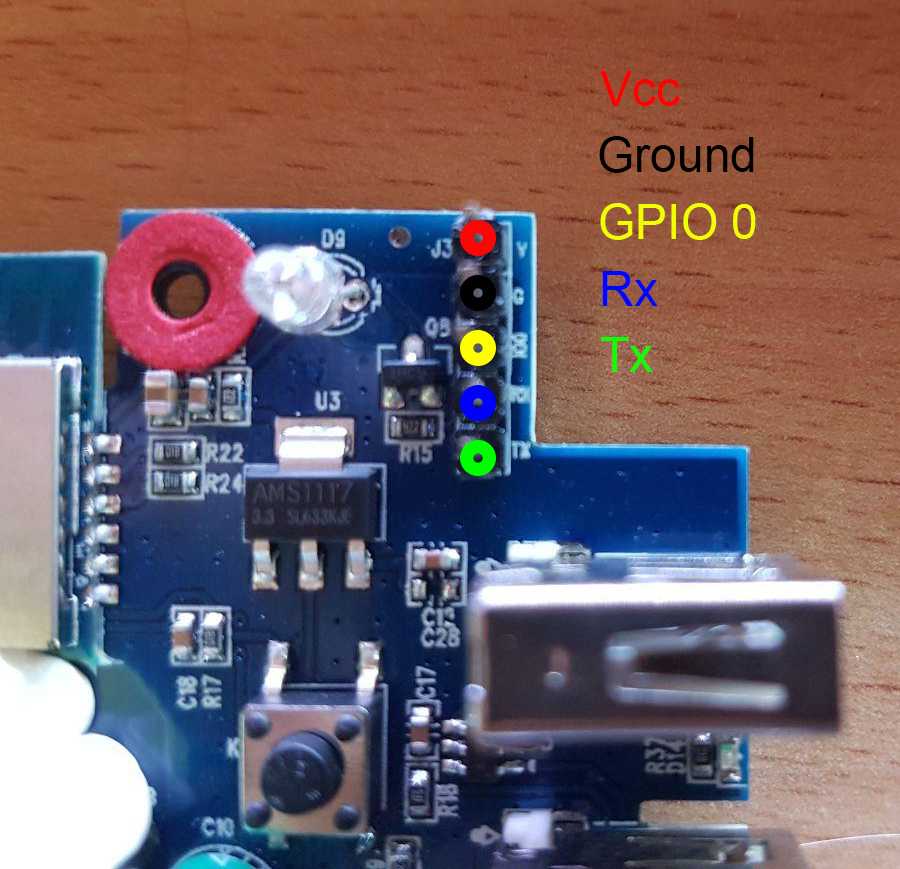
Pins
Pins are at the corner, near usb ports. Vcc is not 3V, it needs to be >4V. To configure chip for flashing GPIO0 needs to be pulled down to ground at boot.


GPIO Pinout
| Pin | Function |
|---|---|
| GPIO12 | Relay1 |
| GPIO13 | Button (pullup, inverted) |
| GPIO14 | Relay2 |
| GPIO05 | Relay3 |
| GPIO15 | Relay4 (usb power) |
| GPIO00 | Blue LED |
Basic Config
The configuration has some default sensors for wifi reporting etc. There are LED's showing the state of each socked, but they are not settable through GPIO's, they just reflect the state of the socket directly.
substitutions: device_name: shp9 # NO Powermeasurement # BW-SHP9 # relay1 is set up as a lamp, and the button is controlling the relay1 # All relays can be controlled through Esphome/HA, but the button only controls relay1 # Wifi is set with static IP, and fast_connect is used as the SSID is hidden # The Web server is active, and both web_server and OTA is protected by PW.
esphome: name: '${device_name}'
esp8266: board: esp8285 # OTA flashingota: - platform: esphome
wifi: # Your Wifi network details # Enable fallback hotspot in case wifi connection fails ap:
# Enabling the logging componentlogger: baud_rate: 0
# Enable Home Assistant APIapi:
# Enable the captive portalcaptive_portal:
# Button configurationbinary_sensor: - platform: gpio id: button internal: true pin: number: GPIO13 mode: INPUT_PULLUP inverted: true on_press: - light.toggle: relay1
# Config for switchesswitch: - platform: gpio pin: GPIO14 id: relay2 name: 'livingroomextension-socket2' - platform: gpio pin: GPIO5 id: relay3 name: 'livingroomextension-socket3' - platform: gpio pin: GPIO15 id: relay4 name: 'livingroomextension-usb-socket'
# Relay1 is set up as a lightoutput: - platform: gpio id: light_relay pin: GPIO12
# Relay1 is set up as a lightlight: - platform: binary id: relay1 name: Floorlamp output: light_relay
# Status LED for connectionstatus_led: pin: number: GPIO0Advanced config additions
In the esphome section, you can perform actions when the device boots:
on_boot: then:# - switch.turn_on: relay1 - switch.turn_on: relay2 - switch.turn_on: relay3 - switch.turn_on: relay4